Um Deine Emailadresse zu ändern, wende Dich bitte über das Kontaktformular an unser Support Team.
Kontaktformular
Die Kollegen transferieren dann den Tracker und alle Daten auf Deine neue Emailadresse
Support Center
Answers about your GPS tracker, the PowUnity app, your subscription and more.
No matching answer
Try a different keyword or open a support ticket below.
Um Deine Emailadresse zu ändern, wende Dich bitte über das Kontaktformular an unser Support Team.
Kontaktformular
Die Kollegen transferieren dann den Tracker und alle Daten auf Deine neue Emailadresse
If you have decided to say goodbye to PowUnity, you may be looking for an easy way to delete your account.
Whether you no longer use the app or simply want to remove your personal data - it's quick and easy with a few simple steps.
In this guide, we'll show you how to delete your PowUnity account safely and easily.
Just follow the steps and say goodbye to PowUnity. We will miss you...
Steps to delete your account:
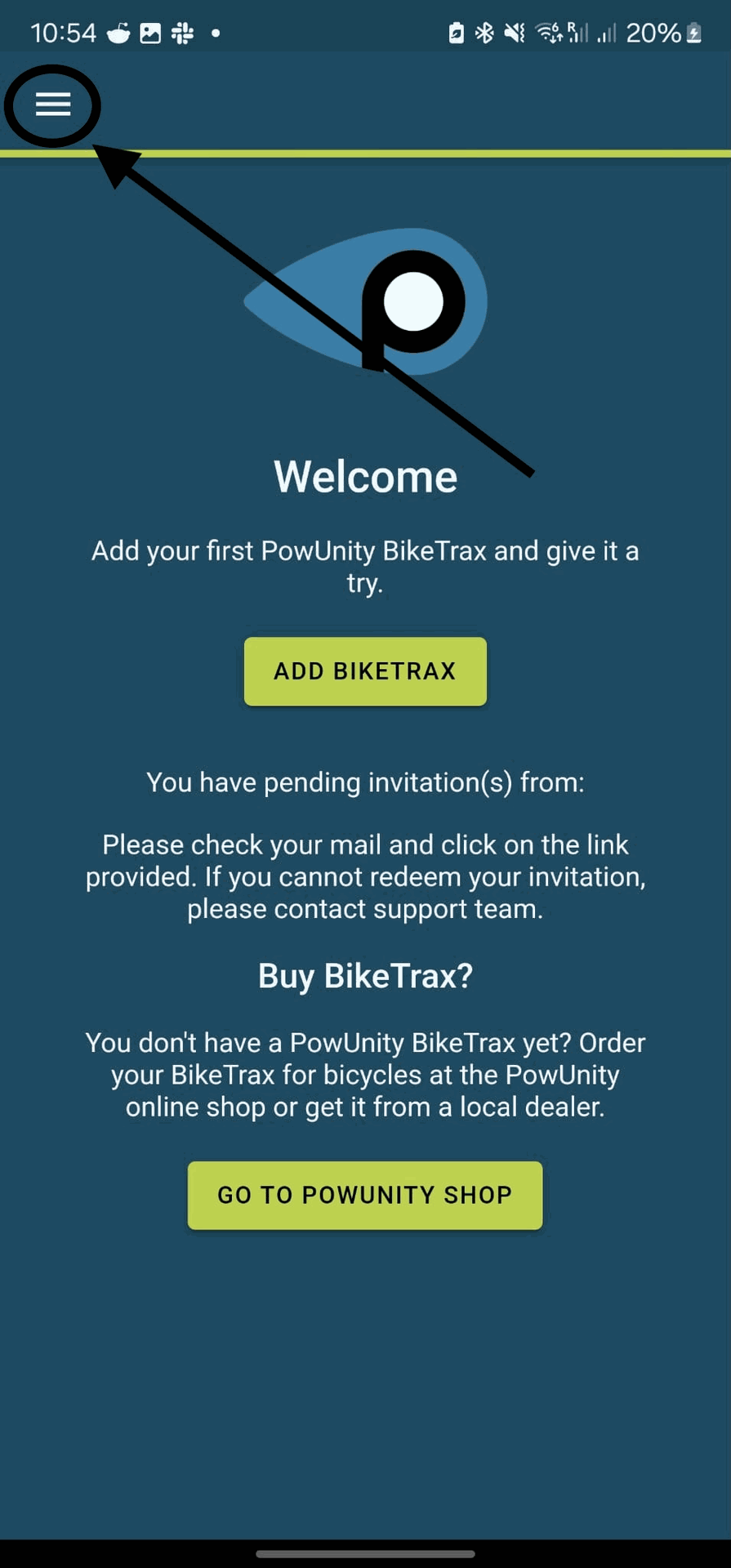
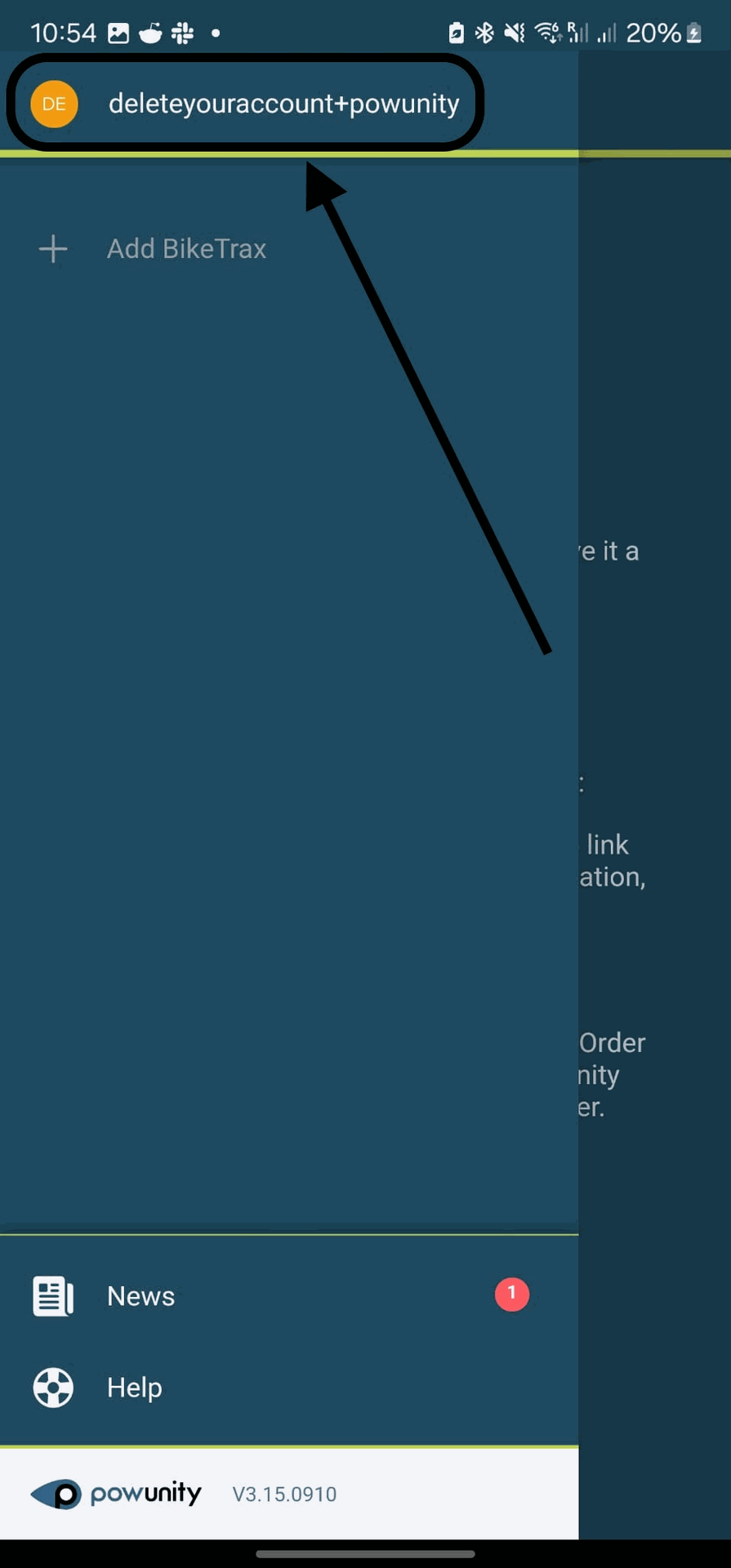
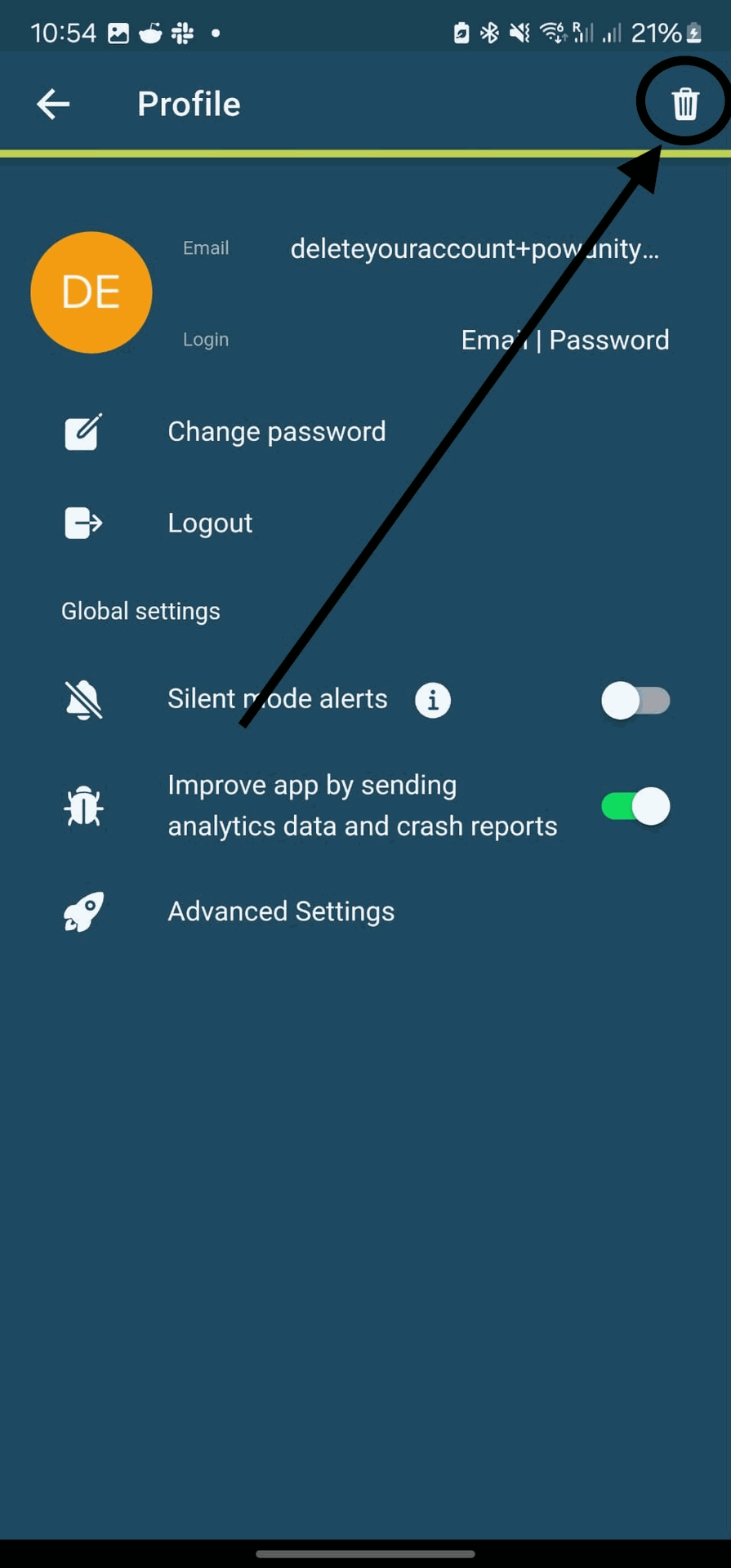
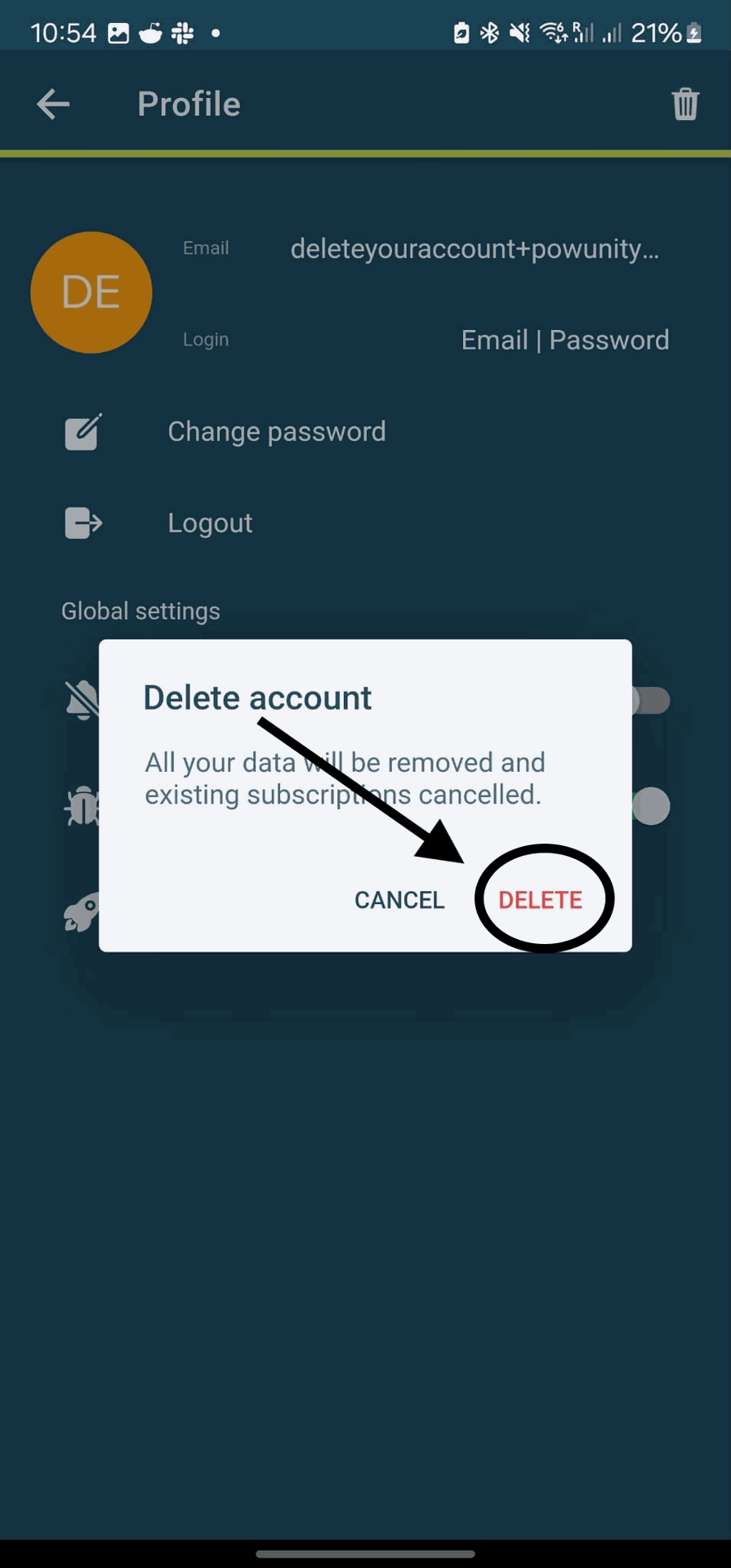
Don't worry, the problem can usually be solved quickly! Here are two possible causes and solutions:
In many cases, it helps to uninstall the app once, restart the device and then reinstall the app from the App Store or Play Store. This is particularly important if the app has been restored from a backup after a device replacement.
Our app uses browser functions to connect to the server. Some manufacturer browsers are limited in their functions, which can lead to problems when logging in. We recommend setting Google Chrome or Firefox as the default browser.
How to change the default browser on Android:
Yes, you can add multiple GPS trackers to one customer account.
A separate subscription is required for each GPS tracker.
You can conveniently manage all added GPS trackers in the PowUnity app.
Yes, you can easily access the tracker from multiple smart devices.
Simply log in to the app on any additional smartphone or tablet using the same user credentials that you used for the initial installation of the tracker.
You can then view and control the tracker on any device.
You can also share your tracker with other people.
The prerequisite is that the person also has a PowUnity user account.
You can find out exactly how this works in the article:
You can share your tracker with another user.
For security reasons, a GPS tracker can only be linked to one account at a time. If your tracker is already registered, please contact the previous owner or the seller of the bike so that they can remove the tracker from their account.
Once you have done this, you can easily add the GPS tracker to your account.
Sie kennen den Vorbesitzer nicht? Kein Problem – wenden Sie sich an unser Support-Team, wir helfen Ihnen gerne weiter. Senden Sie uns den Kaufbeleg und ein Foto des Ortungsgeräts mit der ID des Ortungsgeräts (zu finden auf dem Aufkleber am Anschlusskabel).
Click here for the contact form:
PowUnity Support
Yes, you can find our web app at the following URL.
Log in with the same data as for the smartphone app:
https://app.powunity.com/
If you move to a new mobile phone, simply install the app on your new device and log in with your usual user data.
All your data and settings will then also be available on your new device.
If the app was installed via a backup, there may sometimes be problems logging in.
In this case, simply uninstall the app, restart the smartphone and reinstall the app - then everything should work smoothly!
To secure your bike, simply tap the lock symbol in the app. Tapping the icon again deactivates the lock. The colours of the symbol indicate the current status:
The distance travelled is displayed in the route view if it takes longer than 5 minutes and if the distance covered is longer than 500 metres.
If you do not see your GPS tracker in the app, it is very likely that it has been added to a different account.
A GPS tracker can only be assigned to one account at a time.
Please check whether you are logged into the PowUnity app with the correct email address.
If you previously registered with a different email address, please log in again using that address.
The GPS tracker switches to standby mode after 5 minutes without movement.
If the GPS tracker was therefore unable to send data for a longer period of time, the battery level will be calculated and not measured.
After the next trip, the battery level will be recalculated automatically and then displayed correctly again.
This keeps your bike in view at all times without consuming energy unnecessarily.
Please note, however, that the tracker can only send the data if there is mobile phone reception. In a building (basement, garage, etc.) it may be that there is no reception and the SIM card cannot send the data.
The data is buffered and sent subsequently as soon as reception is available again.
Switch on your bike and shake it briefly in the open air so that the GPS-Tracker wakes up from standby mode.
After a few minutes, the current position should be displayed correctly in the app again.
If adding fails in step 2 (radio network search), it is usually because the GPS tracker is not receiving any power from the bike. You can check whether the tracker is getting warm by leaving the bike switched on for at least 10 minutes. If it warms up, this means that there is voltage. In this case, you can try the following:
If the configuration cancels in step 3, it is because the tracker cannot receive a GPS signal.
Please make sure that the antenna of the tracker is not covered by metal or carbon after installation, as these materials can block the GPS signal.
The antenna should be correctly aligned to the outside - the PowUnity logo indicates the correct position.
For installation in the user account, we recommend placing the bike switched on in an outdoor location so that the GPS signal is optimally received.
If it still doesn't work, a longer journey can often help to ensure that a valid GPS signal is received.
Dimensions:
Tracker: 7.2 x 2 x 1 cm
Additional battery: 4 x 3 x 0.8 cm.
Consumption:
In motion 3 watts
In standby (without movement) 0.1 watts.
Voltage range: 5V - 49V
Temperature range:
- 20 degrees to +55 degrees
The runtime of the additional battery depends on whether the bike is in motion or in standby mode.
In motion: 10 hours
In standby: 180 days
When in motion: 14 hours
In standby: 21 days
When moving:
GPS tracking without the tracker receiving additional power from the e-bike or vehicle battery.
In stand-by mode:
The tracker switches to standby after 5 minutes without movement to save power and ensure the battery lasts as long as possible.
Yes, it is basically correct that the 2G network will be switched off in the long term. However, millions of devices are currently still connected to this mobile communications standard, for example industrial and sensor machines. Therefore, the 2G network cannot be switched off in the short term or across the board.
According to information from mobile network operators close to us, the shutdown will only be gradually introduced in most European countries in the coming years.
👉 Attention: In Switzerland, the 2G network has already been switched off.
We will actively contact all customers with an active GPS tracker in the course of the year and submit a corresponding offer.
Yes, we'd love to 😊
You can contact us at any time - we'll be happy to provide you with a customised quote.
Trackers with an ID starting with 8710xxx are already 4G devices.
You can find the ID in the tracker settings in the PowUnity app (cogwheel symbol next to the tracker name).
The tracker should NOT be surrounded by metal or carbon, as these materials can block GPS signals. We therefore recommend installing it under a plastic cover to ensure optimum signal transmission.
If you resell your e-bike including the GPS tracker, it is important to remove the tracker from your account before handing it over.
This ensures that the new owner can use the GPS tracker in their own account without any problems.
Important to know:
How to delete the GPS tracker from your account:
The GPS tracker is now ready for its new owner 🚲📱.
Die Verwendung einer eigenen SIM-Karte ist nicht möglich Unser System ist für unsere eigene SIM-Karte optimiert
Wir senden Ihnen gerne die entsprechenden Montageanweisungen zu. Bitte teilen Sie uns über das Kontaktformular die genaue Motorbezeichnung mit.
Click here for our contact form:
powunity.com/de/kontakt
Ja, E-Bikes sind keine Voraussetzung . Wichtig ist lediglich, dass eine Stromquelle vorhanden ist, die unser GPS-Ortungsgerät und den mitgelieferten Zusatzakku mit Strom versorgt . So können Sie das Ortungsgerät auch in Motorrädern und anderen Fahrzeugen verwenden, wo es direkt an die Batterie angeschlossen wird.
You can read the specifications here:
Spezifikationen
Unsere App ist nicht direkt mit dem Akku verbunden, sondern empfängt die Daten über unseren Server. Der GPS-Tracker sendet den Akkustatus über die SIM-Karte an den Server, und die App ruft diese Daten ab.
Wenn der Batteriestatus nicht richtig angezeigt wird, kann dies an der Batterie selbst oder an einer fehlenden Datenverbindung liegen.
In beiden Fällen können Sie sich an einen Fachhändler oder unseren Support wenden. Wenn Sie eine neue Batterie benötigen, helfen wir Ihnen gerne weiter!
Sie können unser Serviceteam hier kontaktieren:
Kontaktformular
Wenn Sie den GPS-Tracker neu installiert haben, überprüfen Sie Folgendes:
1. Sind die Verbindungskabel richtig angeschlossen? Manchmal hilft es, wenn Sie den GPS-Tracker und den Zusatzakku erneut trennen und wieder anschließen.
2. Bosch Gen4-Motoren: Wurde der PowerPort/High Power Port von einem Fachhändler aktiviert?
3. Wenn der GPS Tracker an den Lichtanschluss angeschlossen ist – ist das Licht eingeschaltet?
Lassen Sie das Fahrrad mindestens 10 Minuten lang eingeschaltet und überprüfen Sie, ob sich der GPS-Tracker erwärmt.
Wenn der GPS Tracker und somit auch der kleine Akku Spannung vom Bike bekommen ist in dem kleinen Batterie Icon unten links ein kleiner Blitz zu sehen
To ensure that the GPS Tracker for Bosch Generation 4 works properly, please observe the following steps:
If you have any further questions or need support, we will be happy to help you! 🚴♂️⚡
We have protected our battery system against deep discharge.
This means you can leave your bike unused for a longer period of time without damaging the battery.
The additional battery of the GPS tracker is not charged while the bicycle battery is being charged.
Whether and when the additional battery is charged depends on the motor and connection in which the GPS tracker is installed. Depending on the system, the connection can be made, for example, via the light, display or PowerPort connection.
👉 Important: For the additional battery to be charged, the respective connection must be active and supplying voltage – for example:
How can you tell if the additional battery is being charged?
In the PowUnity app, you will see a lightning bolt in the battery icon on the home screen as soon as the additional battery is being charged ⚡️.
If you activate the subscription via our APP, there are the following payment options:
On our website, you can also purchase a voucher code for a one-year subscription (this subscription does not renew automatically):
powunity.com/produkt/app-abo-abschliessen
The following payment options are available:
You will receive an order confirmation and a separate email with the voucher code.
Enter the voucher code as follows:
The fee is incurred because, in the background, a contract for a mobile phone with a SIM card is concluded.
This is necessary because the data transmission from the GPS-Tracker to the server is sent via mobile internet.
There are different cost models, depending on how you have equipped your e-bike with the GPS tracker:
Then you can choose:
You can cancel your active subscription via the app as follows:
If you sell your e-bike, you must delete the GPS tracker from your account.
The new owner can then add the GPS tracker to their own PowUnity app, use the remaining term of your subscription, and afterwards take out a new subscription.
Yes, your subscription will be automatically renewed for the selected term unless it is cancelled before it expires.
Shortly before that, you will receive an email from us reminding you of this, so the protection for your e-bike remains active without interruption.
You can manage your subscription at any time in the PowUnity app.
A subscription always applies per GPS tracker and not per account.
If you use multiple GPS trackers in one account, a separate subscription is required for each GPS tracker.
You can manage all GPS trackers and related subscriptions clearly in the PowUnity app.
Yes, your subscription will be automatically renewed for the selected term unless it is cancelled before it expires.
Shortly before the renewal, you will receive a notification email from us, ensuring that the protection for your e-bike remains active without interruption.
You can manage your subscription at any time in the PowUnity app.
Our support team is happy to help you with your GPS tracker.